Business cards are one of the smallest printed pieces your company may order, but they carry a lot of weight. A card might be handed to a new lead, tucked into a thank-you note, displayed at a front desk, or shared at a trade show. When it looks professional, it supports your brand. When something is off, people notice.
Many business card printing mistakes happen before the file ever reaches the press. A logo is too low in resolution. A phone number has one wrong digit. The card uses a paper stock that does not match the brand. The artwork was built without bleed, so the final trim does not look right.
The good news is that most problems are preventable. If you understand what to check before ordering, you can save time, reduce reprints, and get business cards that look polished from the first box.
Why Business Card Printing Mistakes Happen
Business cards often feel simple because they are small. That can lead people to rush the process. A business owner may create a design quickly in an online tool. An office manager may reorder from an old file without checking updated titles. A marketing team may send artwork that looks fine on screen but is not ready for print.
Print production has details that are easy to miss if you do not handle them every day. Trim size, bleed, color mode, safe margins, image resolution, paper choice, coating, and finishing can all affect the final result. None of these are difficult to manage, but they do need attention.
Before you order, slow down long enough to review the file, the content, and the print specifications. A few extra minutes can prevent a disappointing batch of cards.
Business Card Printing Mistakes That Can Hurt Your Final Product
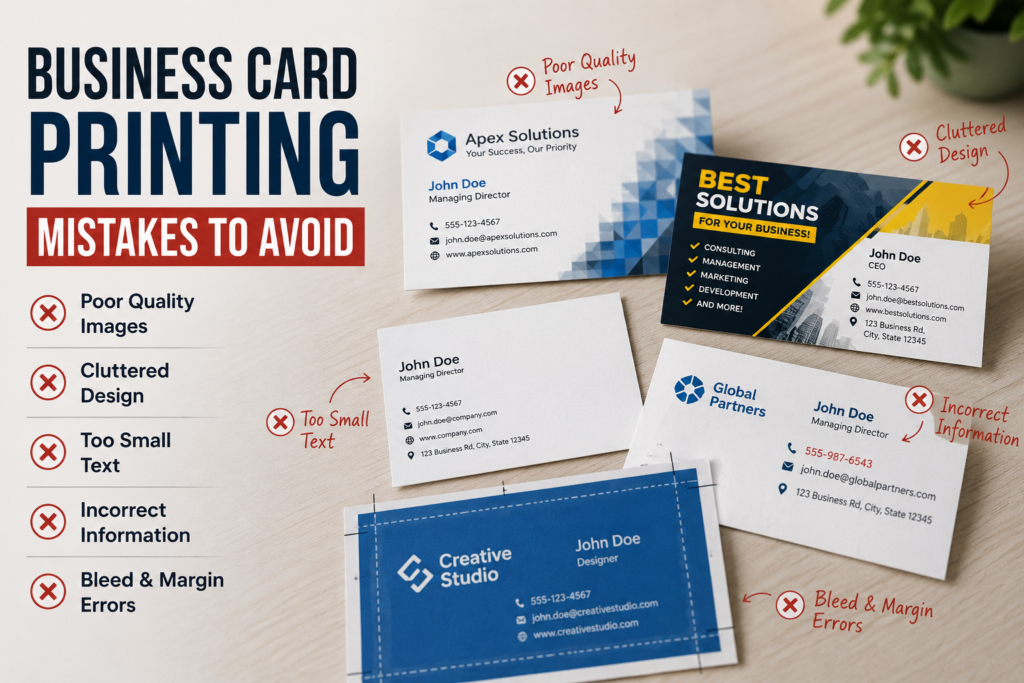
1. Using a low-resolution logo or image
A logo that looks acceptable on a website may not print sharply on a business card. Web graphics are often smaller files designed for screens, not print. When those files are enlarged or printed, they can appear blurry, pixelated, or rough around the edges.
Whenever possible, use a vector logo file, such as an AI, EPS, or properly prepared PDF. Vector artwork can scale cleanly without losing quality. If you only have a raster image, ask your print shop whether the resolution is acceptable before production.
2. Forgetting bleed and safe margins
Bleed is extra artwork that extends beyond the final trim edge. It helps prevent unwanted white edges after the cards are cut. Safe margin is the area inside the trim line where important text and logos should stay so they are not too close to the edge.
Exact bleed and margin requirements can vary by printer, equipment, and job setup, so confirm the specs before submitting artwork. If your design has a background color, photo, pattern, or graphic that goes to the edge, bleed is especially important.
3. Placing text too close to the edge
Even with accurate trimming, small shifts can happen during cutting. If your phone number, website, or logo sits too close to the edge, the card may feel cramped or uneven. In the worst case, important information could be trimmed into.
Good business card design leaves breathing room. Keep contact details comfortably inside the safe area and avoid crowding every corner. A little white space often makes the card easier to read and more professional.
4. Choosing fonts that are too small or too thin
Small type can be hard to read, especially on textured paper, dark backgrounds, or glossy coatings. Thin font weights can also lose clarity, depending on the printing method, paper, and ink coverage.
Before printing, review the card at actual size, not just zoomed in on your screen. If you have to squint, the recipient probably will too. Prioritize readability for names, titles, phone numbers, email addresses, and websites.
5. Not proofreading every detail
Proofreading sounds obvious, but it is one of the most common business card design mistakes. Names, job titles, phone numbers, extensions, email addresses, websites, office locations, social handles, and QR codes all need careful review.
Do not rely on one person to proof the card. Have the cardholder check their own information, then have someone else review it with fresh eyes. For companies ordering cards for multiple employees, use a simple approval process before sending the final file to print.
6. Using outdated branding
Small businesses change over time. Logos get updated, colors shift, taglines change, and office addresses move. If you reorder from an old file without checking the current brand standards, the new cards may not match your website, signage, brochures, or email signatures.
Before reprinting, confirm that the business card matches your current brand. This is especially important if your team recently refreshed your logo, launched a new website, changed service names, or updated social media handles.
7. Picking paper without thinking about use
Paper choice affects how a business card feels, how it holds up, and how people perceive the brand. A lightweight stock may not create the impression you want for a premium service. A heavy or specialty stock may be a great choice for some brands, but not necessary for every use.
Think about how the cards will be used. Sales teams that hand out cards daily may need a practical, durable option. A boutique brand may want a thicker stock or unique finish. A service company may need cards that can be written on easily. If you are not sure, ask to see paper samples before ordering.
8. Choosing a finish that conflicts with the card design
Coatings and finishes can change both appearance and function. Gloss can make colors feel more vibrant, but it may show fingerprints and can be harder to write on. Matte finishes often feel softer and more understated. Specialty options can create a memorable look, but they need to be planned into the design.
Before selecting a finish, consider the card’s purpose. Will employees write appointment reminders on the back? Will the card include a QR code? Does the design use fine details or large dark areas? Your print shop can help you choose a finish that fits the artwork and the way the card will be used.
9. Ignoring color differences between screen and print
Colors on a monitor are not always an exact match for printed color. Screens use light, while printed pieces use ink or toner on paper. Bright blues, greens, and oranges can be especially different depending on the file, paper, and print method.
If brand color is critical, talk with your printer before production. They may recommend a proof, specific color setup, or a production method that better supports your needs. Do not assume that what you see on your laptop or phone will be identical on paper.
10. Sending the wrong file type
A screenshot, low-quality JPEG, or editable document may not be the best file for professional business card printing. The preferred file type depends on the printer’s workflow, but print-ready PDFs are commonly used because they can preserve layout, fonts, images, and trim settings when prepared correctly.
Before submitting your order, ask what file format your print shop prefers. Also ask whether fonts should be outlined, images should be embedded, or templates should be used. Requirements can vary, so it is better to confirm than guess.
11. Not checking QR codes before printing
QR codes are useful on business cards, especially when they link to a website, appointment page, digital contact card, menu, portfolio, or review page. But they need to be tested before the file goes to print.
Scan the QR code at actual size from a printed proof or sample if possible. Make sure the link works, loads quickly, and goes to the correct destination. Also avoid placing a QR code too close to the edge or on a busy background that may interfere with scanning.
12. Ordering too many cards with uncertain information
Buying more cards can be efficient, but only if the information will stay accurate. If your company is about to move, hire for a new role, update its website, or change phone systems, think carefully before ordering a large quantity.
For new businesses, it may be smarter to confirm the basics first, then reorder once the brand and contact details are stable. Your print shop can help you weigh quantity options without overcommitting to cards that may become outdated.
13. Waiting until the last minute
Business cards are often needed for trade shows, meetings, open houses, conferences, recruiting events, and sales calls. If you wait until the day before, you may have fewer paper, finish, proofing, or delivery options.
Turnaround times vary based on quantity, finishing, proof approval, equipment schedule, and shipping or pickup needs. If you have a firm deadline, share it when requesting a quote. That gives the print shop a chance to recommend realistic options.
Business Card File Setup Tips Before You Order
A clean file helps the production team print and finish your cards accurately. Before sending artwork, check the basics:
- Confirm the final card size with your print shop.
- Include bleed if the design runs to the edge.
- Keep important text and logos inside the safe area.
- Use high-resolution images and clean logo files.
- Proofread all names, titles, numbers, email addresses, and websites.
- Check that QR codes scan correctly.
- Ask about preferred file format and export settings.
- Confirm whether the card is one-sided or two-sided.
- Review paper stock, coating, and finishing before approval.
If your team is ordering cards for several employees, create a standard template. This keeps spacing, logo placement, fonts, colors, and formatting consistent across the company.
Paper and Finishing Choices Matter
A business card is tactile. People feel the paper before they read every word. That is why stock and finish should not be an afterthought.
Common choices may include uncoated, matte, gloss, silk, textured, recycled, extra-thick, or specialty stocks, depending on what your print provider offers. Finishing options may also include rounded corners, spot gloss, foil, embossing, painted edges, or other effects.
Not every finish works for every design or timeline. Some finishing options require special setup, extra production steps, or design adjustments. If you are considering a specialty card, ask questions early so the artwork is built correctly from the start.
When to Ask Your Print Shop for Help
You do not need to become a print expert to order professional business cards. A good print shop can review your file, explain options, and flag potential concerns before production. It is much easier to fix a file before printing than after the cards are cut and boxed.
Ask for help if you are unsure about bleed, color, paper, QR codes, file type, finishing, or readability. You should also reach out if you are working from an old logo, designing cards for multiple employees, or preparing for an event with a firm deadline.
When requesting a quote, share the quantity, card size, one-sided or two-sided printing, paper preferences, finish preferences, deadline, and whether you already have print-ready artwork. If you are not sure about any of those details, say so. Your printer can guide you through the options.
Conclusion: Avoid Business Card Printing Mistakes Before They Cost You
The most common business card printing mistakes are usually simple things: low-resolution logos, missing bleed, tiny text, outdated information, poor paper choices, or rushed proofing. But small errors can affect the way your business is perceived.
Before your next order, take time to review the file, content, paper, finish, and deadline. If anything feels uncertain, ask your print shop to look it over before production. That extra step can help you get professional business cards that are accurate, readable, and ready to hand out with confidence.
Need help preparing a business card order? Contact our team to request a quote, review your file, or compare paper and finishing options before you print.
Business Card Printing FAQ
What is the biggest mistake people make when ordering business cards?
One of the biggest mistakes is approving the order without carefully proofreading every detail. Contact information, spelling, job titles, and QR codes should all be checked before production.
Do business cards need bleed?
If the design has color, images, or graphics that extend to the edge, bleed is usually needed. Exact bleed requirements vary by print provider, so confirm the specifications before submitting artwork.
What file type should I send for business card printing?
Many print shops prefer a print-ready PDF, but requirements vary. Ask your printer which file type, color settings, bleed, and font handling they prefer before sending final artwork.
Should I choose matte or gloss business cards?
It depends on the design and how the cards will be used. Gloss can make colors appear brighter, while matte often provides a softer look. If people need to write on the card, ask your print shop which finish is best.
How early should I order business cards before an event?
Order as early as possible, especially if you need specialty paper, finishing, proofing, shipping, or cards for multiple employees. Turnaround times vary, so share your deadline when requesting a quote.